VKS 3.7.0 - Protect Inter-Node Traffic with Antrea WireGuard Encryption
Table of Contents
The latest vSphere Kubernetes Service (VKS) 3.7.0 release added a lot of great new features. I’m particularly thrilled about the ability to use arbitrary Helm charts as VKS cluster addons. But there’s one awesome new feature that came in under the radar. I only discovered it while reviewing the VKS documentation.
For VKS clusters on vSphere Kubernetes Release (VKr) 1.36 and using the Antrea CNI, you can now enable WireGuard encryption for inter-node traffic. All it takes is adding trafficEncryptionMode: wireGuard to a cluster’s Antrea AddonConfig. No messing around with encryption keys or pre-shared keys.
Aside from just being a good security practice, this feature is especially critical for people with strict data-in-transit security requirements. Even if you take great care to ensure all of your ingress endpoints use HTTPS, it’s not uncommon for internal-only traffic to be left unencrypted, such as databases not using TLS. This traffic can be inadvertently exposed when it needs to cross between worker nodes.
Demo #
The best way to show the benefits of this feature is through a demo. I created two VKS clusters in my home lab, both running VKr 1.36.1 with two worker nodes. The only difference is that I applied an Antrea AddonConfig to one of the clusters that enables WireGuard encryption mode.
# WireGuard-enabled VKS Cluster
apiVersion: addons.kubernetes.vmware.com/v1alpha1
kind: AddonConfig
metadata:
  annotations:
    clusteraddon.addons.kubernetes.vmware.com/owned-for-deletion: "true"
  name: wireguard-cluster-antrea
  namespace: lab-ns
spec:
  values:
    antrea:
      config:
        trafficEncryptionMode: wireGuard
---
apiVersion: cluster.x-k8s.io/v1beta2
kind: Cluster
metadata:
  name: wireguard-cluster
  namespace: lab-ns
spec:
  clusterNetwork:
    pods:
      cidrBlocks:
        - 192.168.156.0/20
    services:
      cidrBlocks:
        - 10.96.0.0/12
    serviceDomain: cluster.local
  topology:
    classRef:
      name: builtin-generic-v3.7.0
      namespace: vmware-system-vks-public
    version: v1.36.1---vmware.4-vkr.5
    variables:
      - name: vmClass
        value: best-effort-small
      - name: storageClass
        value: smith-home-lab-nfs
    controlPlane:
      replicas: 1
    workers:
      machineDeployments:
        - class: node-pool
          name: wireguard-cluster-np-1
          replicas: 2
# VKS Cluster without WireGuard encryption
apiVersion: cluster.x-k8s.io/v1beta2
kind: Cluster
metadata:
  name: non-wireguard-cluster
  namespace: lab-ns
spec:
  clusterNetwork:
    pods:
      cidrBlocks:
        - 192.168.156.0/20
    services:
      cidrBlocks:
        - 10.96.0.0/12
    serviceDomain: cluster.local
  topology:
    classRef:
      name: builtin-generic-v3.7.0
      namespace: vmware-system-vks-public
    version: v1.36.1---vmware.4-vkr.5
    variables:
      - name: vmClass
        value: best-effort-small
      - name: storageClass
        value: smith-home-lab-nfs
    controlPlane:
      replicas: 1
    workers:
      machineDeployments:
        - class: node-pool
          name: non-wireguard-cluster-np-1
          replicas: 2
To generate some inter-node application traffic, I installed the example guestbook application from the Kubernetes tutorials. Now it’s time to take a packet capture and generate some user traffic.
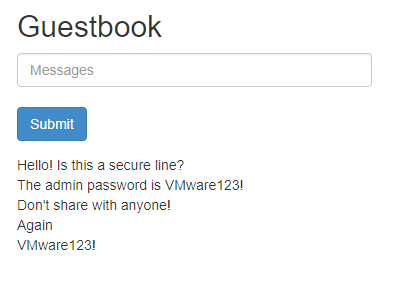
We can compare the packet captures in Wireshark and see the results. Let’s start with the default VKS cluster without WireGuard enabled. We’re going to focus on the Redis (RESP) and DNS protocols. We’ll ignore HTTP traffic for now since that only demonstrates the security at ingress, which is not covered by inter-node WireGuard encryption.
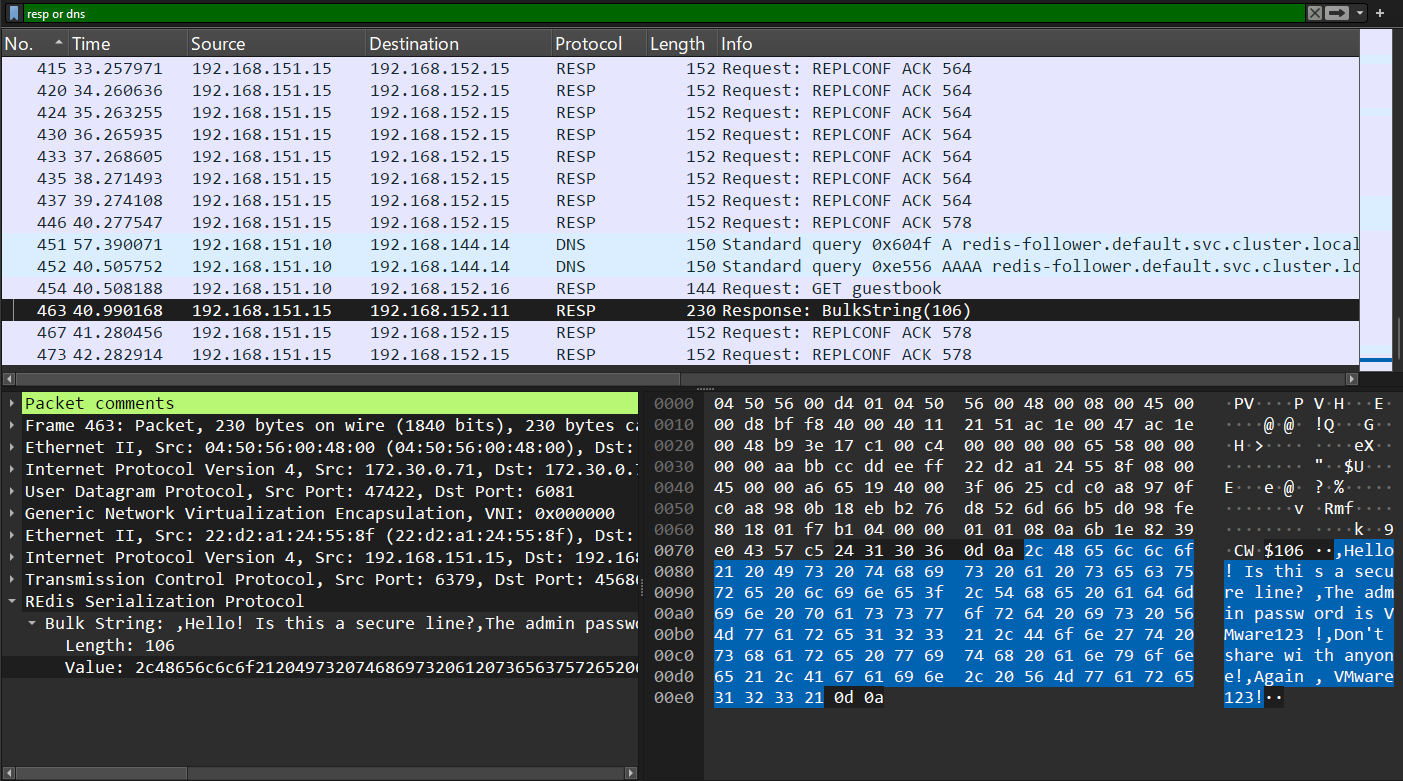
We can immediately see that we captured plaintext application data, including DNS queries and Redis database messages. In fact, the highlighted Redis packet reveals all of the guestbook messages. Now let’s compare it to the WireGuard-enabled cluster.
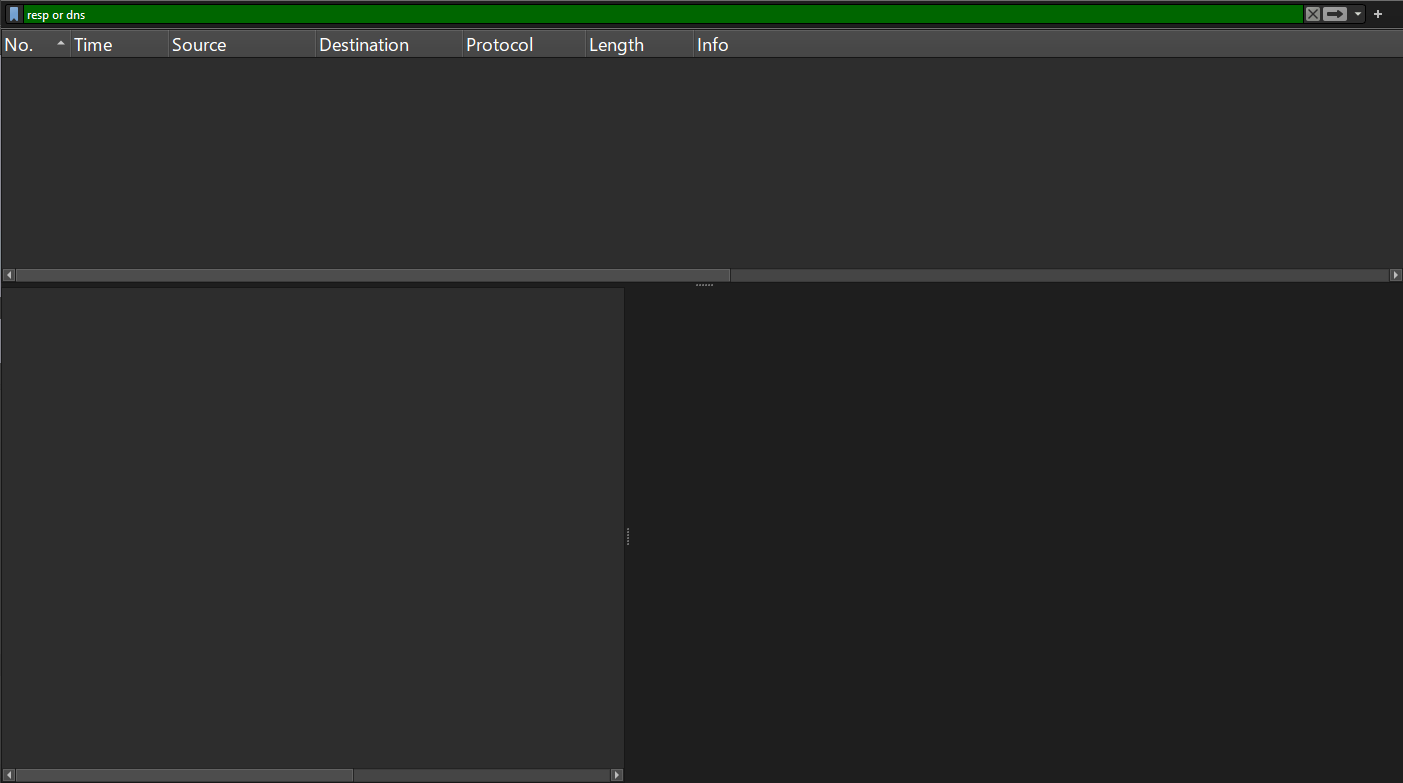
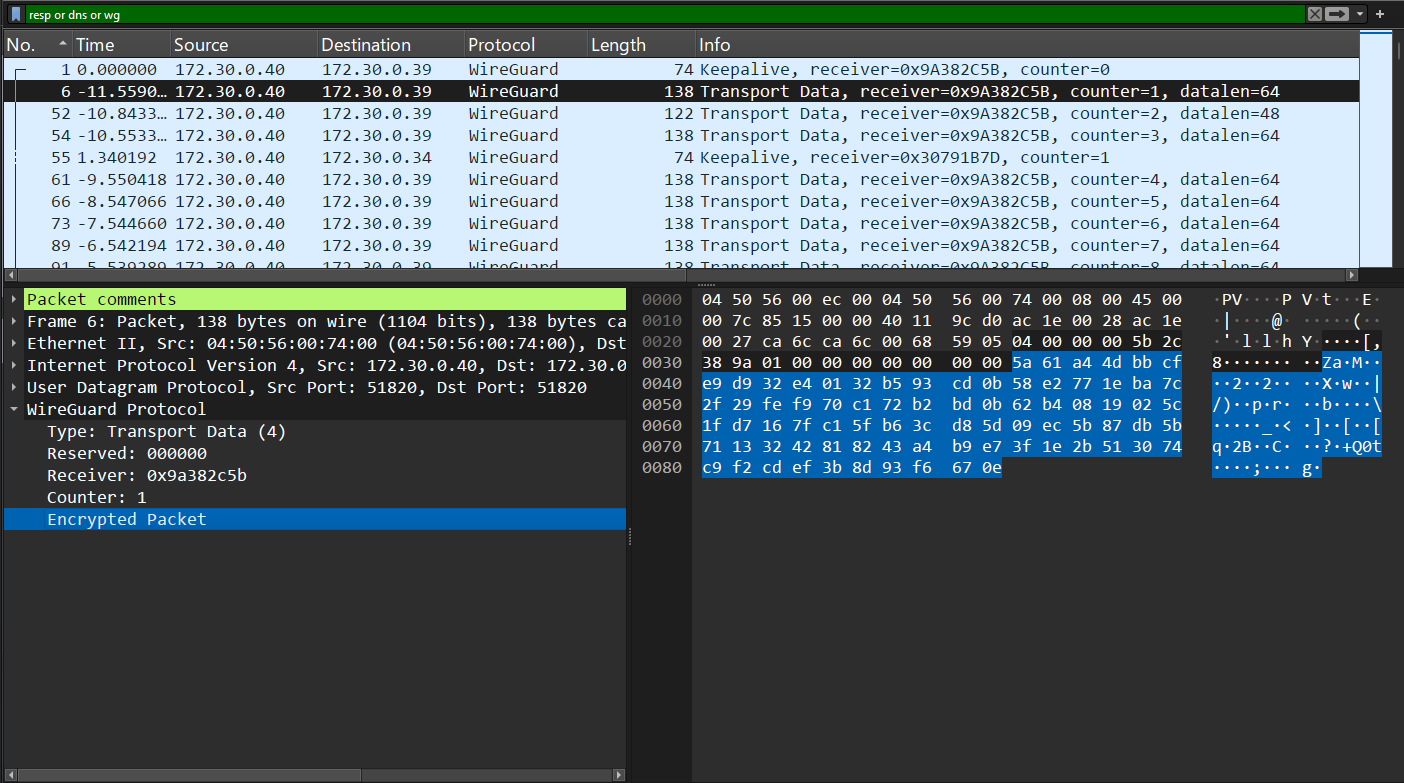
Absolutely no internal application traffic was exposed! To see what’s actually being sent between nodes, we just need to add the WireGuard (wg) protocol to our filter. This shows us all of the encrypted inter-node traffic.
However, even with inter-node traffic encryption in-place, it’s still critical to ensure you use HTTPS at your ingress points. Antrea WireGuard encryption only protects traffic between nodes. If you use unencrypted HTTP for ingress to an application, that data will remain unencrypted when it enters the cluster. We can demonstrate this by including HTTP traffic in our filter for the WireGuard cluster’s packet capture.
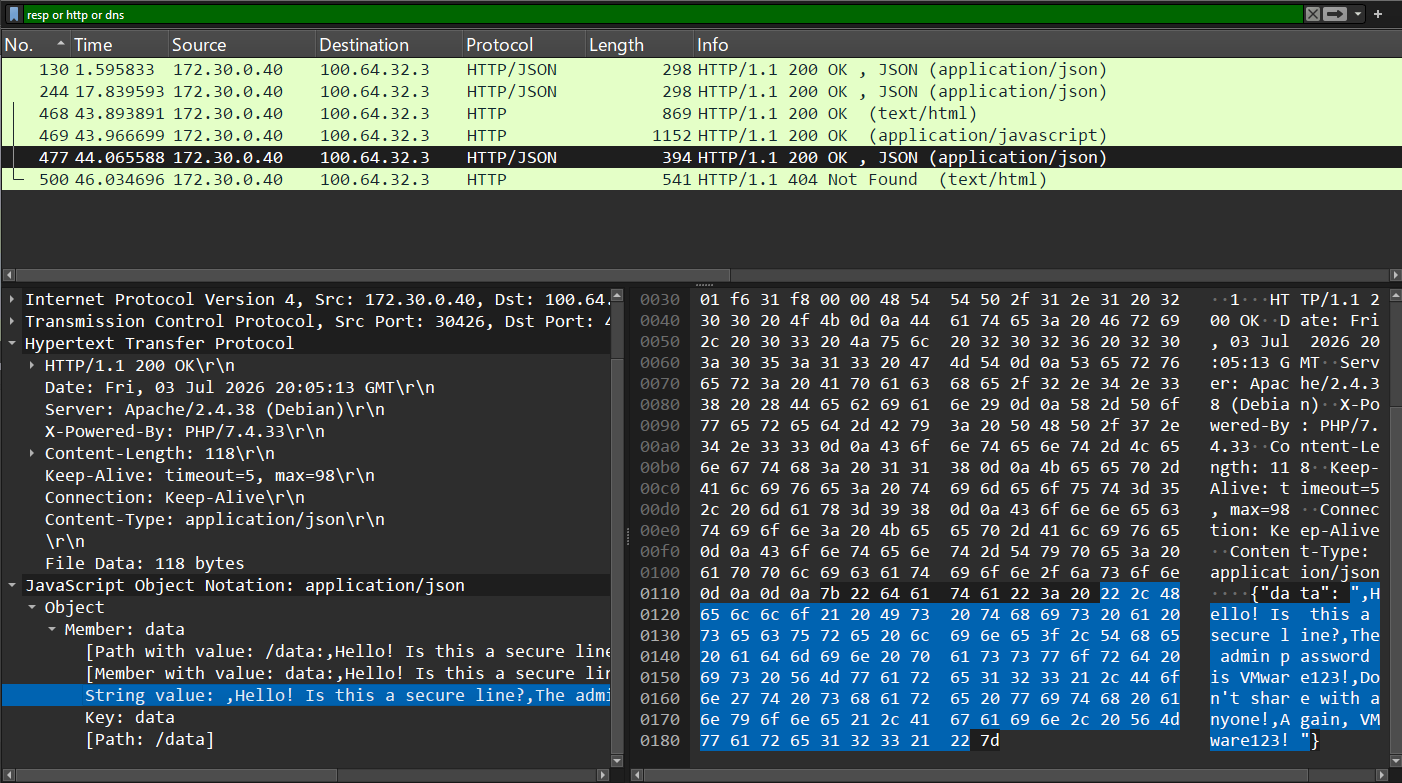
You can see that the same user data was exposed here as in the non-WireGuard cluster. It’s only at the ingress point instead of between nodes.
MTU Configurations #
One thing to note is that Antrea CNI automatically adjusts the MTU for your VKS cluster when enabling WireGuard encryption. If you compare the pod MTU between the two clusters, the normal cluster is configured with a pod MTU of 1450 bytes. Meanwhile, the WireGuard-enabled cluster bumps this down to a pod MTU of 1440 bytes. So there’s hopefully no need to worry about adjusting MTU configurations when enabling this feature.
# Cluster without WireGuard
$ kubectl --kubeconfig non-wireguard-cluster.kubeconfig run test-mtu --image=alpine -it --rm
All commands and output from this session will be recorded in container logs, including credentials and sensitive information passed through the command prompt.
If you don't see a command prompt, try pressing enter.
/ # ip link show eth0
2: eth0@if38: <BROADCAST,MULTICAST,UP,LOWER_UP,M-DOWN> mtu 1450 qdisc noqueue state UP qlen 1000
    link/ether 32:e4:ec:3b:cc:99 brd ff:ff:ff:ff:ff:ff
# WireGuard-enabled cluster
$ kubectl --kubeconfig wireguard-cluster.kubeconfig run test-mtu --image=alpine -it --rm
All commands and output from this session will be recorded in container logs, including credentials and sensitive information passed through the command prompt.
If you don't see a command prompt, try pressing enter.
/ # ip link show eth0
2: eth0@if24: <BROADCAST,MULTICAST,UP,LOWER_UP,M-DOWN> mtu 1440 qdisc noqueue state UP qlen 1000
    link/ether 66:83:21:07:ec:42 brd ff:ff:ff:ff:ff:ff
What About Istio Service Mesh? #
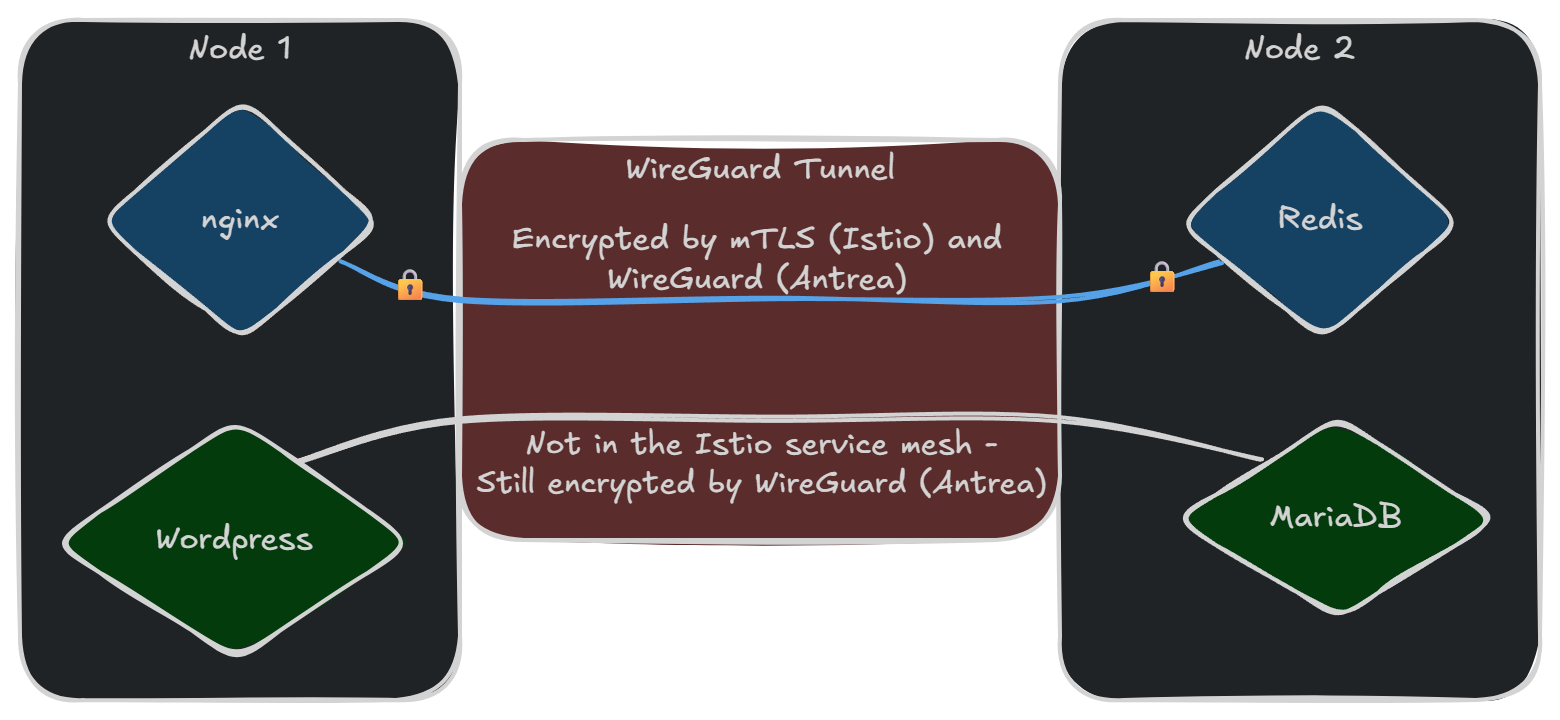
While inter-node WireGuard encryption seems like a competing feature to Istio service mesh, they actually attempt to solve two different issues. And in fact, they can complement each other very well.
Istio often encrypts inter-node traffic, but it’s actually focused on the security and authorization of traffic between applications – or at the application layer. Istio encrypting traffic between nodes is really just a happy side effect of that. Istio also only encrypts applications that are added to its service mesh. This leaves all other traffic is still unencrypted when transiting between nodes – or at least not additionally encrypted.
Antrea’s WireGuard encryption operates at the network layer and is exclusively focused on encrypting all traffic crossing between nodes. Which also covers applications that are not included in the Istio service mesh. Even if you intend to add everything in a cluster to the service mesh, enabling WireGuard encryption in Antrea is still a valuable defense-in-depth technique to catch anything that is accidentally left out.